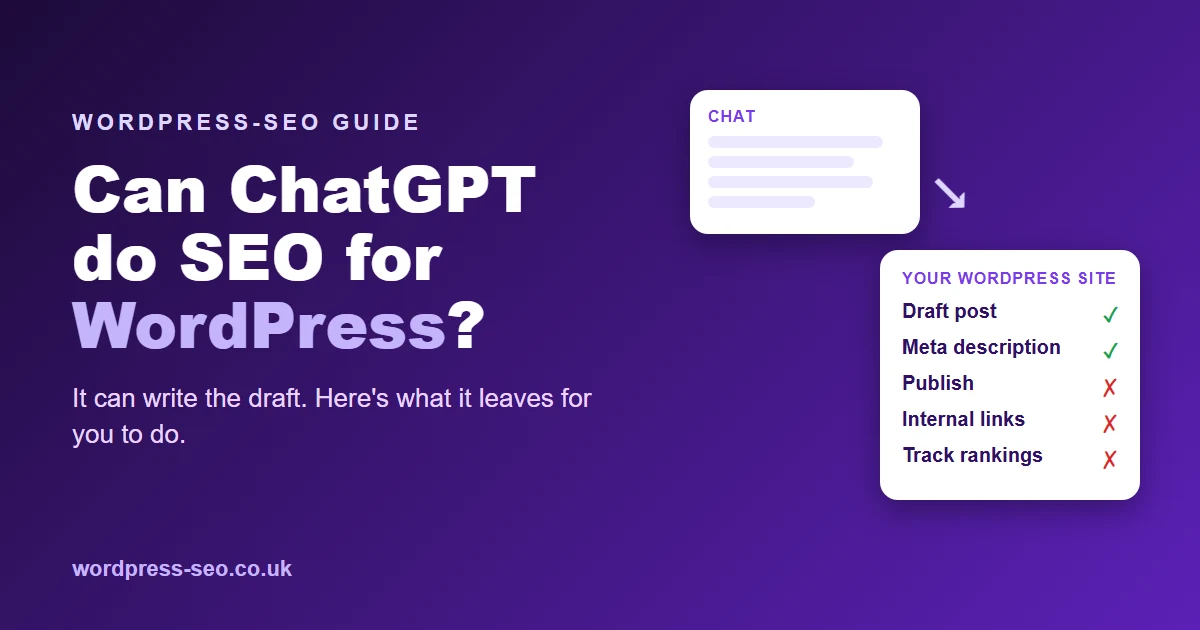
ChatGPT can help with SEO on a WordPress website, but it can't run it for you. It is good at drafting posts, suggesting SEO titles and meta descriptions for your SEO plugin, writing image alt text and explaining technical problems. It can't log in to your WordPress dashboard, see how your theme and plugins are set up, publish posts, link them to your existing pages or check your rankings afterwards. A person, or a connected tool, still has to do that part.
WordPress powers a huge share of the web. According to W3Techs, it was used by 39.7% of all websites in recent years. That means a great many UK business owners are sitting in front of the WordPress editor with ChatGPT open in another tab, wondering how much of their SEO they can hand over to it.
AI is already part of how content gets written. A recent Orbit Media survey of content marketers found that over 90% now use AI for blogging. So the real question isn't whether to use it, but which jobs on a WordPress site it does well and which still need doing another way.
Where ChatGPT genuinely helps on a WordPress site
First drafts for posts and pages
Give ChatGPT your notes, the question a customer asked you and the points you want to make, and it will turn them into a structured draft with headings you can paste into the block editor. Ask it to keep paragraphs short and to use H2 and H3 headings, which map neatly onto WordPress heading blocks.
The fields in your SEO plugin
Most WordPress sites use an SEO plugin such as Yoast SEO, Rank Math or All in One SEO (if you're unsure whether you need one, see our guide on whether you need an SEO plugin for WordPress), each with boxes for an SEO title, a meta description and often a focus keyphrase. ChatGPT is good at producing several options that fit the usual length limits, roughly 60 characters for a title and 155 for a description. Pick the one that is most accurate, not the most dramatic.
Image alt text
Every image in your media library has an alt text field, and on many sites it's empty. Describe the photo to ChatGPT and ask for a plain, specific description. It helps people using screen readers and gives Google context, as long as it describes the image rather than repeating a keyword.
Explaining technical warnings
Paste in a Site Health warning, a message from Google Search Console or the contents of your robots.txt file, and ask what it means. ChatGPT is usually good at turning jargon into a clear next step, such as which setting to check or what to ask your web developer or host. If the warnings keep piling up, a full WordPress website audit gives you one prioritised fix list instead.
Where ChatGPT hits WordPress's limits
- It can't see your site's set-up. It doesn't know which theme you use, which plugins are active, how your categories are organised or which pages already exist. Advice that ignores those details can clash with what's already there.
- It can't publish. On its own, ChatGPT doesn't create posts, upload featured images, choose categories or fill in your SEO plugin's fields. You copy, paste and tidy up each time.
- It can't link to your existing content reliably. Good internal links point to real URLs on your site. ChatGPT doesn't know them, so it either leaves links out or guesses at addresses that don't exist.
- Pasted text needs fixing. Copying from a chat window into the block editor can bring across odd formatting, stray symbols and headings at the wrong level.
- It can be confidently wrong. AI tools sometimes invent statistics, prices or rules. On a business website, an invented claim can mislead customers.
- It doesn't follow up. It won't check next month whether a post was indexed, which searches it appears for or whether it needs updating.
Never paste your WordPress login into a chat
As people try to connect AI tools to WordPress, it's tempting to share an admin username and password. Don't. If a tool or service needs to publish to your site, use a method designed for it.
- Application Passwords. Since WordPress 5.6, each user can create separate Application Passwords for connecting other services through the WordPress REST API. They can be revoked one at a time without changing your main login.
- A dedicated connector plugin. Some services provide a plugin that connects with its own secure token, so no password is shared at all.
- The least access needed. WordPress user roles let you give a connected account only the permissions it needs, rather than full administrator rights.
A practical ChatGPT workflow for WordPress SEO
- Choose one search per post. Search it on Google first and look at what already ranks, so you know what the post must answer.
- Brief ChatGPT with your facts. Include your services, the area you cover and anything specific to your business. Tell it not to add statistics or prices you haven't supplied.
- Ask for an outline, then the draft. Agree the headings first; it keeps the post focused.
- Paste into the block editor and tidy up. Check heading levels, remove stray formatting and break up long paragraphs.
- Add your own expertise. Real examples, local detail and opinions are what make a post worth ranking.
- Fill in your SEO plugin fields, add a featured image with alt text and choose a sensible category.
- Link it in. Add links to your relevant service pages and from older posts to the new one. Our guide to optimising WordPress content for Google covers this in more detail.
- Check it in Search Console over the following weeks.
It works, but it takes time. Orbit Media's same survey found the average blog post takes 3 hours 20 minutes to write, before you count publishing and linking. That is where many WordPress blogs stall: the first few posts go up, then client work takes over. If that sounds familiar, read our guide to automating your WordPress SEO.
Will Google mind if ChatGPT helped write your posts?
Not on that basis alone. Google's guidance on AI-generated content says it rewards helpful content however it is produced. Its concern is content made mainly to manipulate rankings, such as publishing large numbers of thin posts. On a WordPress site, the practical safeguard is simple: publish fewer, better posts that a customer would find useful, and check every fact before you press Publish.
The flip side: getting ChatGPT to recommend you
ChatGPT is also becoming a place where people look for businesses. Ofcom reported that ChatGPT had 1.8 billion UK visits in the first eight months of 2025, up from 368 million in the same period of 2024. In the US, a recent BrightLocal Local Consumer Review Survey found a significant increase in consumers using ChatGPT or other AI tools for local business recommendations.
For a WordPress site, being recommended starts with the basics: making sure AI crawlers aren't blocked (our AI Readiness Check tests this), publishing clear posts that answer real questions, and keeping your business details consistent. Our GEO service covers this, and our AI Visibility Check shows whether ChatGPT currently recommends your business and who it names instead.
How WordPress-SEO fills the gaps
WordPress-SEO uses AI language models too, but wraps them in the parts ChatGPT leaves to you. Articles are planned around your focus keyphrases and the details you give us about your business, written in UK English, and published straight to your WordPress site through our free WordPress-SEO Connect plugin. It connects with its own secure token, so no passwords are shared. Each post arrives as a normal WordPress post with its featured image, category, excerpt and meta description, and the meta description is filled in for Yoast SEO, Rank Math or All in One SEO if you use one of them.
You approve each article or switch on automatic publishing, and we track your rankings every week. Plans start from £49 a month, with a £1 trial and the option to cancel anytime. The full details are on our pricing page. If you are still deciding how to set up your own SEO plugin, our guide on choosing an SEO plugin for WordPress is a useful starting point.
Frequently Asked Questions
Can ChatGPT publish posts to my WordPress site?
Not on its own. ChatGPT writes text in a chat window; you still need to create the post, add images, fill in your SEO plugin and publish. Services that publish for you connect through WordPress Application Passwords or a dedicated plugin, never by sharing your login.
Is it safe to use ChatGPT content on a WordPress blog?
Yes, if it is accurate, useful and edited for your business. Google says it rewards helpful content however it is produced. Check every fact, add your own expertise and avoid publishing lots of thin posts in a short time.
Can ChatGPT write my Yoast or Rank Math meta descriptions?
Yes. It is good at suggesting SEO titles and meta descriptions that fit the usual length limits. Paste in your post's main points, ask for several options, then choose the one that describes the page most accurately.
Do I still need an SEO plugin if I use ChatGPT?
Usually, yes. An SEO plugin handles site-wide settings such as XML sitemaps, title templates and structured data. ChatGPT can help you fill in its fields, but it does not replace the plugin.
Should I give ChatGPT or any AI tool my WordPress admin password?
No. If a service needs to publish to your site, create an Application Password for it, or use its own connector plugin, and give the connected account only the permissions it needs. You can revoke access at any time without changing your main password.
Want your WordPress posts planned, written, published and tracked for you? Try WordPress-SEO for 7 days for £1, including 3 articles and a free website audit worth £49.